
# 语法基础
- 必须有 main 函数作为入口,且不需要主动调用
- var 声明变量,不存在变量提升
- 文档 (opens new window)
# 变量
- 变量只是一个引用,存储的时对象的地址
- 声明变量
- 明确指定类型:int a = 1;
- 不指定类型:var a = 1; 或 dynamic a = 1;(var 一旦赋值,则确定类型,dynamic 一直保持不确定)
- 变量值默认时 null,且不存在隐式转换
# 常量
- 一旦声明,不可修改
- 常量声明
- const 声明:const a = 1;
- final 声明:final a = 1;
- const 和 final 的区别:const 声明的常量是编译时常量,final 声明的常量是运行时常量
const time = DateTime.now(); // 报错
final time = DateTime.now(); // 正常
# 数据类型
- Number
- String
- Boolean
- List,列表(数组)
- Map,映射
- Set,集合
- 其它
# Number
声明:
- num,包含 int 和 double
- int
- double
常用方法:
// 类型转换
3.8.toString(); // 3.8
int.parse('3'); // 3
double.parse('3.8'); // 3.8

// 数学运算
3.8.toInt(); // 3,向下取整
3.8.floor(); // 3,向下取整
3.8.ceil(); // 4,向上取整
3.8.round(); // 4,四舍五入
3.1415926.toStringAsFixed(2); // 3.14,保留两位小数
10.remainder(3); // 1,求余

// 判断
10.compareTo(3); // 1,比较大小,大于返回1,等于返回0,小于返回-1
0/0.isNaN; // true,判断是否为NaN
-1.isNegative; // true,判断是否为负数

// 随机数
import 'dart:math';
Random().nextInt(10); // 0-9
# String
- 单双引号:没有区别
- 三个引号:可以包含换行符
常用方法:
// 判空
''.isEmpty; // true
' '.isNotEmpty; // true

// 查找
'hello world'.contains('world'); // true
'hello world'.startsWith('hello'); // true
'hello world'.endsWith('world'); // true
'hello world'.indexOf('world'); // 6

// 拼接
String str1 = 'hello';
String str2 = 'world';
'$str1 $str2'; // hello world
str1 + str2; // helloworld

// 分隔
String str = 'hello world';
str.split(' '); // ['hello', 'world']

// trim
' hello world '.trim(); // hello world

// 截取
str.substring(0, 5); // hello
str.substring(6); // world

// RegExp(r'正则表达式')
var isPhone = RegExp(r'^1\d{10}$');
isPhone.hasMatch('12345678901'); // true

// 替换
String str = 'hello world';
str.replaceAll('world', 'dart'); // hello dart
'a1b1c1d1'.replaceAll(RegExp(r'\d+'), '_'); // a_b_c_d
# Boolean
对变量判断时,不存在隐式转换。
var a;
if(a){}// 报错
if(a === null){}// 正确
# List
声明:
- 字面量方式
- 构造函数方式
// 字面量方式
var list = [1, 2, 3, 'a'];// 不限定类型
List list = <int>[1, 2, 3];// 指定类型

// 构造函数方式
List list = new List.empty(growable: true);// 不限制长度
List list = new List(3);// 限制长度
List list = new List.filled(3, 6);// 限制长度且指定默认值 [6,6,6]

// 扩展运算符
var l1 = [1, 2, 3];
var l2 = [4, 5, 6];
var l3 = [...l1, ...l2]; // [1, 2, 3, 4, 5, 6]

// 列表长度
l1.length; // 3
[].isEmpty; // true
[].isNotEmpty; // false

// 列表反转
l1.reversed; // (3, 2, 1) 可迭代但不是列表

// 转换为列表
l1.reversed.toList(); // [3, 2, 1]

// 添加元素
l1.add(4); // [1, 2, 3, 4]
l1.addAll([4, 5, 6]); // [1, 2, 3, 4, 5, 6]

// 删除元素
l1.remove(1); // [2, 3]
l1.removeAt(1); // [1, 3]

// 修改元素
l1[0] = 0; // [0, 2, 3]

// push pop
l1.add(4); // [1, 2, 3, 4]
l1.removeLast(); // [1, 2, 3]

// unshift shift
l1.insert(0, 0); // [0, 1, 2, 3]
l1.removeAt(0); // [1, 2, 3]

// 清空
l1.clear(); // []

// 合并
['hello', 'world'].join(' '); // hello world

// 遍历
// for、for...in、forEach、map、where、any、every
var nums = [1,2,3];

for(var i = 0; i < nums.length; i++){
  print(nums[i]);
}

for(var i in nums){
  print(i);
}

nums.forEach((item){
  print(item);
});

// 注意 map、where 是返回一个可迭代对象,需要使用 toList 转换为列表
nums.map((item){
  return item * 2;
}).forEach((item){
  print(item);
});

// 相当于 js:[].filter
var l = nums.where((item)=> item % 2 == 1);
print(l.toList()); // [1, 3]

nums.any((item)=> item % 2 == 1); // true
nums.every((item)=> item % 2 == 1); // false

// 相当于 js:[].reduce
nums.reduce((prev, item){
  return prev + item;
}); // 6

nums.fold(10, (previousValue, element) => previousValue + element);// 16
# Set
- 无序元素唯一的集合
- 无法通过下标取值
- 特有操作:交集、并集、差集
// 字面量声明
<int>{1,2,2,3}// {1,2,3}

// 构造函数声明
Set<int> set = new Set();
set.add(1);
set.add(2);
set.add(2);
set.add(3);
set // {1,2,3}

// 与 List 相互转换
set.toList(); // [1,2,3]
[1,2,2,3].toSet(); // {1,2,3}

// 访问
set.contains(1); // true
set.length; // 3
set.isEmpty; // false
set.isNotEmpty; // true

// 集合特有操作
var s1 = {1,2,3};
var s2 = {2,3,4};

// 交集
s1.intersection(s2); // {2,3}

// 并集
s1.union(s2); // {1,2,3,4}

// 差集
s1.difference(s2); // {1}
# Map
- 无序的键值对(k-v)映射集
// 字面量声明
var map = {'name': '张三', 'age': 18};// {'name': '张三', 'age': 18}

// 构造函数声明
Map map = new Map();
map['name'] = '张三';
map['age'] = 18;
map // {'name': '张三', 'age': 18}

// 访问
map['name']; // 张三
map.length; // 2
map.isEmpty; // false
map.isNotEmpty; // true
map.containsKey('name'); // true
map.containsValue('张三'); // true

// 如果 key 不存在才赋值
map.putIfAbsent('name', () => '李四'); // 张三

// 遍历
map.keys.toList(); // [name, age]

map.values.toList(); // [张三, 18]

map.forEach((key, value){
  print('$key: $value');
});

// 删除
map.remove('name'); // {'age': 18}
map.clear(); // {}
map.removeWhere((key, value) => key == 'name'); // 按条件删除
# 其它类型
- Runes,符文
- 是一个 UTF-32 位字符对象,用于把文字转为
符号表情或特定的文字 - 文档 (opens new window)
var str = '👏';
print(str); // 👏
print(str.length)// 2 , dart 默认的字符串编码是 UTF-16,所以一个 emoji 表情占两个字符
print(str.runes.length); // 1

// 将字符串转为 Runes
Runes input = new Runes('\u{1f680}');
print(new String.fromCharCodes(input)); // 🚀
- Symbols,符号
- 用 # 开头来表示的标识符
var a = #abc;
print(a); // Symbol("abc")

var b = new Symbol('abc');
print(b); // Symbol("abc")

print(a == b); // true
print(#abc === new Symbol('abc')); // true
- dynamic,动态类型
dynamic a = 1;
a = 'hello';
# 运算符
- 加减乘除余,条件逻辑等都跟 js 一样
- 地板除:
~/,返回整数 - 类型判断运算符:
is、is!,用于判断对象是否为指定类型 - 避空运算符:
??、??=,用于判断对象是否为空,为空则返回指定值 - 条件属性访问:
?.,用于判断对象是否为空,为空则不执行后续操作 - 级联运算符:
..,用于对同一个对象进行一系列操作
// 地板除
7 ~/ 4; // 1

// 类型判断运算符
[] is List; // true
[] is! List; // false

// 避空运算符
1 ?? 3; // 1
null ?? 3; // 3

var a;
a ??= 3; // 3

// 条件属性访问
var obj;
obj.length; // 报错
obj?.length; // 不报错,返回 null

// 级联运算符
Set s = new Set();
s..add(1)..add(2)..add(3)..remove(2);// {1,3}
// 等价
s.add(1);
s.add(2);
s.add(3);
s.remove(2);
# 函数
# 声明与参数
// 声明不需要 function 关键字
void main(){
  print('hello world');
}

// 返回值跟函数声明的类型一致
int sum(int a, int b){
  return a + b;
}

// 匿名函数
var sum = (int a, int b){
  return a + b;
};

// 箭头函数,注意它只是一种简写,不像 JS 会改变 this 指向,也不产生其它副作用
var sum = (int a, int b) => a + b;

// 立即执行函数
void main(){
  ((){
    print('hello world');
  })();
}

// 必填参数
String hello(String name){
  return 'hello $name';
}
hello('张三');// hello 张三

// 可选参数,中括号 []
String hhh(String name, [int age = 0]){
  return 'hello $name, age is $age';
}
hhh('张三');// hello 张三, age is 0,如果没有默认值,则为 null

// 命名参数,大括号 {}
String hhh(String name, {int age = 0}){
  return 'hello $name, age is $age';
}
hhh('张三', age: 20);// hello 张三, age is 20
# 作用域与闭包
作用域和闭包跟 JS 基本一致。
区分全局作用域和局部作用域,里层可访问外层。
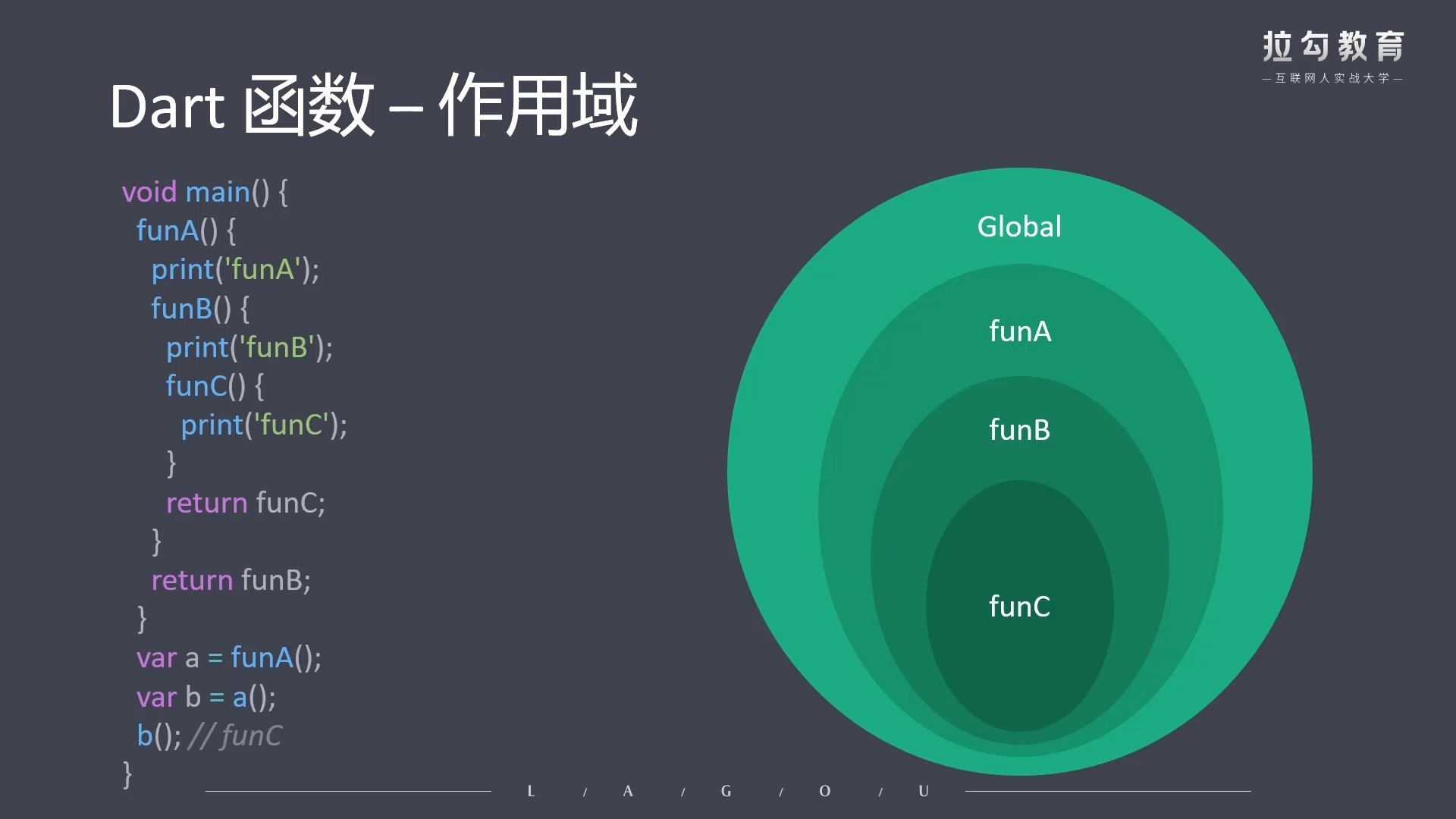
闭包原理:
- 函数嵌套
- 内部函数调用外部函数变量(导致外层作用域对象无法释放)
- 执行外部函数
- 实现变量私有化
a(){
  var x = 2;
  b(){
    x++;
    print(x);
  }
  return b;
}

var f = a();
f(); // 3
f(); // 4
# 异步函数
js 中,异步调用通过
Promise来实现async返回一个Promise对象;await等待一个Promise对象
dart 中,异步调用通过
Future来实现async返回一个Future对象;await等待一个Future对象
异步请求获取 Ip 地址
import 'dart:convert';
import 'package:http/http.dart' as http;

final Uri url = Uri.parse('http://ip-api.com/json/?lang=zh-CN');

Future getIp() {
  return http.get(url).then((response) {
    final body = jsonDecode(response.body);
    final String ip = body['query'];
    print(ip);
    return ip;
  }).catchError((onError) {
    print(onError);
  });
}

void main() {
  getIp();
}
async 声明、await 调用
import 'dart:convert';
import 'package:http/http.dart' as http;

final Uri url = Uri.parse('http://ip-api.com/json/?lang=zh-CN');

Future getIp() async {
  final response = await http.get(url);
  final body = jsonDecode(response.body);
  final String ip = body['query'];
  return ip;
}

void main() async {
  try {
    final ip = await getIp();
    print(ip);
  } catch (e) {
    print(e);
  }
}
# 类与对象
- 声明与访问
class Personal{
  String name = '张三';

  void greet(){
    print('hello $name');
  }
}

void main(){
  var p = new Personal();
  p.name;// 张三
  p.greet(); // hello 张三
}
# 构造函数
# 默认构造函数
class Rect{
  num width;
  num height;

  Rect(num width, num height){
    this.width = width;
    this.height = height;
  }
}

void main(){
  var r = new Rect(10, 20);
  print(r.width); // 10
  print(r.height); // 20
}
简化版
class Rect{
  num width;
  num height;

  Rect(this.width, this.height);
}
# 命名构造函数
使用命名构造函数可以实现多个构造函数,提供额外的清晰度
class Point{
  num x;
  num y;

  Point(this.x, this.y);

  Point.origin(){
    this.x = 0;
    this.y = 0;
  }

  Point.fromJson({x:0, y:0}){
    this.x = x;
    this.y = y;
  }
}

void main(){
  var p1 = new Point(10, 20);
  var p2 = new Point.origin();
  var p3 = new Point.fromJson(x: 10, y: 20);
}
# 常量构造函数
常量构造函数使对象成为编译时常量(提高程序性能)
class ImmutablePoint{
  // 常量构造函数属性必须是 final
  final num x;
  final num y;

  // 常量构造函数,必须通过 const 声明,且不能有函数体
  const ImmutablePoint(this.x, this.y);
}

void main(){
  // 通过 const 实例化(一个不可变对象),而不是 new
  var p1 = const ImmutablePoint(10, 20);
  var p2 = const ImmutablePoint(10, 20);
  identical(p1, p2); // true
  p1 === p2; // true
}
# 工厂构造函数
不会自动生成示例,而是通过代码来决定返回的实例
class Person{
  static Person instance;// 静态属性,它代表缓存的实例

  // 工厂构造函数,它不能使用 this 关键字
  factory Person([String name = 'alex']){
    if(Person.instance == null){// 第一次实例化,缓存实例
      Person.instance = new Person.newSelf(name);
    }

    return Person.instance;
  }

  // 命名构造函数
  Person.newSelf(this.name);
}

// 看似有两次实例化,其实只有一次,节约内存,它实际上是单例模式
void main(){
  var p1 = new Person();
  var p2 = new Person();
  print(identical(p1, p2)); // true
}
# 赋予默认值
class Rect{
  num width;
  num height;

  Rect([num height = 2, num width = 2]){
    this.width = width;
    this.height = height;
  }// var r = new Rect()

  // 或
  Rect({num height = 2, num width = 2}){
    this.width = width;
    this.height = height;
  }// var r = new Rect()

  // 或
  Rect(): height = 2, width = 2{}// var r = new Rect()
}
# 重定向构造函数
class Point{
  double x,y,z;

  Point(this.x, this.y, this.z);// 三维空间点

  Point.towD(double x, double y): this(x, y, 0);// 二维空间点,this指向当前类
}

void main(){
  var p1 = new Point(10, 20, 30);
  p1.z; // 30

  var p2 = new Point.towD(10, 20);
  p2.z; // 0
}
# 访问修饰符
- dart 中并没有像 typescript 那样的 private、protected、public 访问修饰符
- 默认的访问修饰符是 public
- 通过 _ 来实现 private,但只有把类单独抽离到 main.dart 文件中才能生效
./lib/Person.dart
class Person{
  String _name = '张三';
  String getName(){
    return this._name;
  }
}
./main.dart
import './lib/Person.dart';

void main(){
  var p = new Person();
  print(p._name); // 报错
  print(p.getName()); // 张三
}
# Getter 和 Setter
class Circle{
  num r;

  Circle(this.r);

  // Getter
  num get area{
    return 3.14 * this.r * this.r;
  }

  // Setter
  set setR(value){
    this.r = value;
  }
}

void main(){
  var c = new Circle(10);
  print(c.area); // 314.0
  c.setR = 20;
  print(c.area); // 1256.0
}
# Static 关键字
- 指定静态属性和静态方法
- 通过类名直接访问静态属性和静态方法
class Person{
  static String name = '张三';
  int age = 18;

  static void greet(){
    // print(age);// 静态方法中 不能访问 非静态属性和方法
    // print(this.name);// 不能通过 this 访问静态属性
    print(name);
  }

  void say(){
    print(this.age);
    print(this.name);// 非静态方法中 可以访问 静态属性和方法
  }
}

void main(){
  print(Person.name); // 张三
  Person.greet(); // 张三
}
# 元数据
- 以
@开头,给代码标记一些额外的信息,其实并不影响程序执行 - @override,表示重写父类方法
- @required,表示参数是必填的
- @deprecated,表示方法已过时
# 继承
- 子类通过
extends关键字继承父类 - 通过
@override标记覆写方法(子类与父类同名的方法) - 通过
super访问父类的属性和方法
class Father {
  String name = '刘备';
  int age;
  num _money = 100000;

  Father([this.age = 20]);

  void printInfo() {
    print("${this.name}---${this.age}");
  }

  get getMoney {
    return this._money;
  }
}

class Son extends Father {
  String name = '刘禅';

  Son(String name, int age) {
    this.name = name;
    this.age = age;
  }

  @override
  void printInfo() {
    String fatherName = super.name;

    // super._money;// 报错,父类的私有属性不能被子类访问
    num fatherMoney = super.getMoney;// 可以访问公共的get方法

    print(
        "I am son of $fatherName,name is ${this.name},age is ${this.age},I have old money $fatherMoney");
  }
}

void main() {
  Son son = new Son("Tom", 18);
  son.printInfo();// I am son of 刘备,name is Tom,age is 18,I have old money 100000
}
# 抽象类
- 用
abstract关键字修饰的类 - 充当普通类的模板,约定一些必要的属性和方法
- 抽象方法是指没有方法体的方法
- 抽象类不能被实例化
- 抽象类可以被普通类继承(extends),此时,子类必须实现抽象类的所有抽象方法
- 抽象类可以充当接口被实现(implements),此时普通类必须实现抽象类的所有抽象方法和属性
abstract class Phone{
  // 声明抽象方法
  void processor();
  void camera();

  // 抽象类中的普通方法
  void call(){
    print('打电话');
  }
}

class Xiaomi extends Phone{
  // 普通类继承了抽象类,必须实现所有抽象方法
  @override
  void processor(){
    print('骁龙888');
  }

  @override
  void camera(){
    print('1亿像素');
  }
}

void main(){
  var phone = new Phone();// 报错,抽象类不能被实例化

  var xiaomi = new Xiaomi();
  xiaomi.processor(); // 骁龙888
  xiaomi.camera(); // 1亿像素
  xiaomi.call(); // 打电话
}
# 接口
- 接口可以看作一个个小零件,类实现接口,就相当于组装了这些小零件。
- 接口在 Dart 中就是一个类,使用
implements实现 - 普通类实现接口,必须重写接口中所有的属性和方法
- 一个类可以实现多个接口,如
class C implements A, B{...}
abstract class Processor{
  String cores;// 内核
  arch(String name);// 芯片制程
}

abstract class Camera{
  String pixels;// 像素
  brand(String name);// 品牌
  aperture(String name);// 光圈
}

class Phone implements Processor, Camera{
  @override
  String cores;

  @override
  arch(String name){
    print('芯片制程:$name');
  }

  @override
  String pixels;

  @override
  brand(String name){
    print('品牌:$name');
  }

  @override
  aperture(String name){
    print('光圈:$name');
  }
}
# 混入
- 混入
Mixin是一段公共代码,旨在提高代码的复用性class MixinA{...}mixin MixinB{...}
- 作为 Mixin 类只能继承自
Object,不能继承其它类,不能有构造函数 - 使用 with 关键字来混入 Mixin 类,
class MyClass with MixinA, MixinB{...} - 后混入覆盖前混入
mixin MixinA{
  String name = 'MixinA';

  void printA(){
    print('A');
  }
}

mixin MixinB{
  String name = 'MixinB';

  void printB(){
    print('B');
  }
}

class MyClass with MixinA, MixinB{
  void printName(){
    print(this.name);
  }
}

void main(){
  var myClass = new MyClass();
  myClass.printName(); // MixinB,后引入覆盖前引入
  myClass.printA(); // A
  myClass.printB(); // B
}
# 泛型
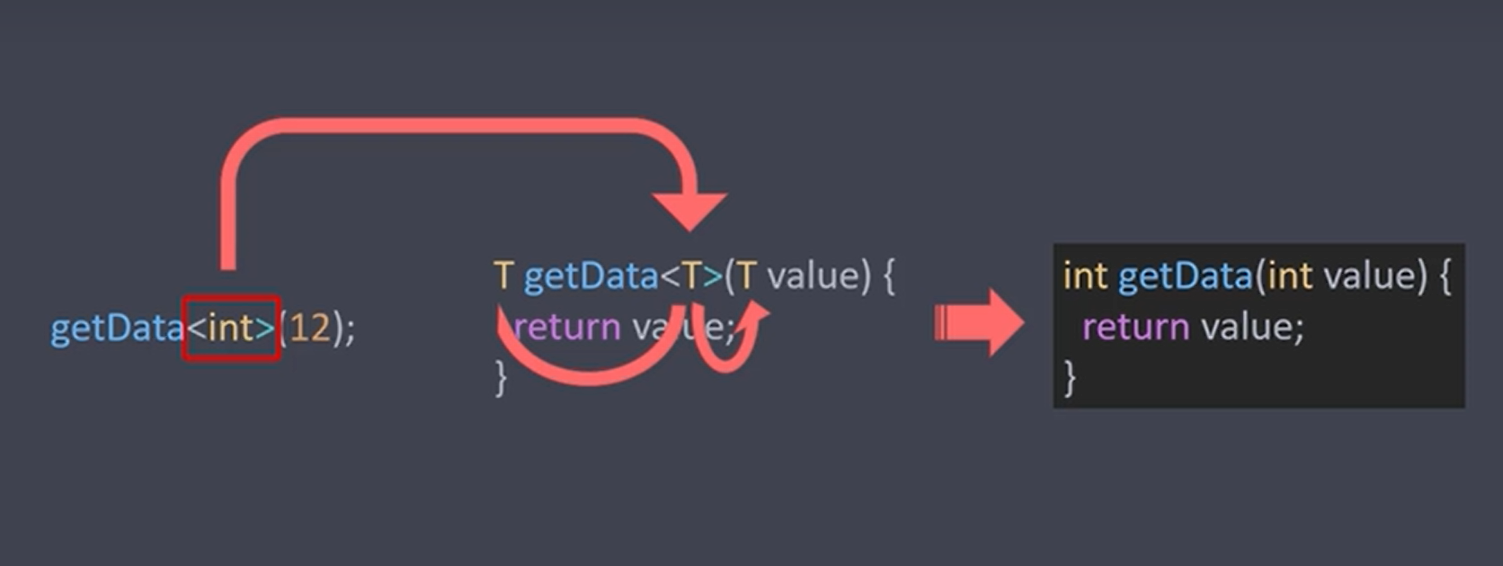
- 在函数、类、接口中指定宽泛数据类型的语法
- 泛型函数
- 泛型类
- 泛型接口
- 使用泛型,可以减少重复的代码
# 泛型函数
通常,在<``>中,使用一个字母来代表类型,如 E、T、K、V 等,格式:
返回类型 函数名<输入类型>(参数类型 参数){
  函数体
}
// 不指定类型,但缺少了校验功能(例如校验输入和输出同个类型)
getData(value){
  return value
}

// 使用泛型函数,保留校验功能
T getData<T>(T value){
  return value
}

getData<int>(20);
getData<String>('hello');

// 只约定参数类型,不约定函数返回类型
getData<T>(T value){
  return value
}
# 泛型类
class MyClass<T>{
  Set s = new Set<T>();

  void add(T value){
    this.s.add(value);
  }

  void info(){
    print(this.s);
  }
}

void main(){
  var mc1 = new MyClass<int>();
  mc1.add(1);
  mc1.add(2);
  mc1.add(3);
  mc1.info(); // {1, 2, 3}

  var mc2 = new MyClass<String>();
  mc2.add('a');
  mc2.add('b');
  mc2.add('c');
  mc2.info(); // {a, b, c}
}
List、Set 都是泛型类
var l1 = new List<int>();
var l2 = new List<String>();
# 泛型接口
abstract class Cache<T>{
  Object getByKey(String key);
  void setByKey(String key, T value);
}

class FileCache<T> implements Cache<T>{
  @override
  Object getByKey(String key){
    return null;
  }

  @override
  void setByKey(String key, T value){
    print('文件缓存:$key $value');
  }
}

void main(){
  var fc = new FileCache<String>();
  fc.setByKey('name', '张三');

  var fc2 = new FileCache<Map>();
  fc2.setByKey('name', {'name': '张三'});
}
# 使用泛型限制参数类型
class A{}

class B{}

class C extends A{}

class Foo<T extends A>{
  String toString(){
    return 'Instance of Foo<$T>';
  }
}

void main(){
  var foo = new Foo<A>();
  print(foo); // Instance of Foo<A>

  var foo2 = new Foo<B>();// 报错,B 不是 A 的子类

  var foo3 = new Foo<C>();// 有效, C 是 A 的子类,输出 Instance of Foo<A>
}
# 枚举
枚举是数量固定的常量值
// 通过 enum 声明
enum Color {
  red,
  green,
  blue
}

// 获取所有枚举值列表
List<Color> colors = Color.values;

// 通过 index 获取值的索引
Color.red.index; // 0
Color.green.index; // 1

// 通过下标访问
Color.values[0]; // Color.red

// 通过 forEach 遍历
Color.values.forEach((item){
  print(item, item.index);// Color.red 0
});
# 库与生态
# 自定义库
# 通过 library 声明库
通过
import '库的位置/库名称.dart'引入库每个 Dart 文件默认都是一个库,只是没有使用
library显示声明,使用小写字母+下划线命名
library my_main
void my_main(){

}
- 使用
_表示库内私有,库内可以访问,库外不可访问
./lib/Person.dart
library my_person;

class Person{
  String _name = '张三';
  String getName(){
    return this._name;
  }
}
./main.dart
import './lib/Person.dart';

void main(){
  var p = new Person();
  print(p._name); // 报错
  print(p.getName()); // 张三
}
# 系统库
通过
import 'dart:库名称'引入库通过光标 +
Ctrl+左键可以查看库源码(路径为dart-sdk/lib/....dart)
import 'dart:core';// 核心库默认引入
import 'dart:math';
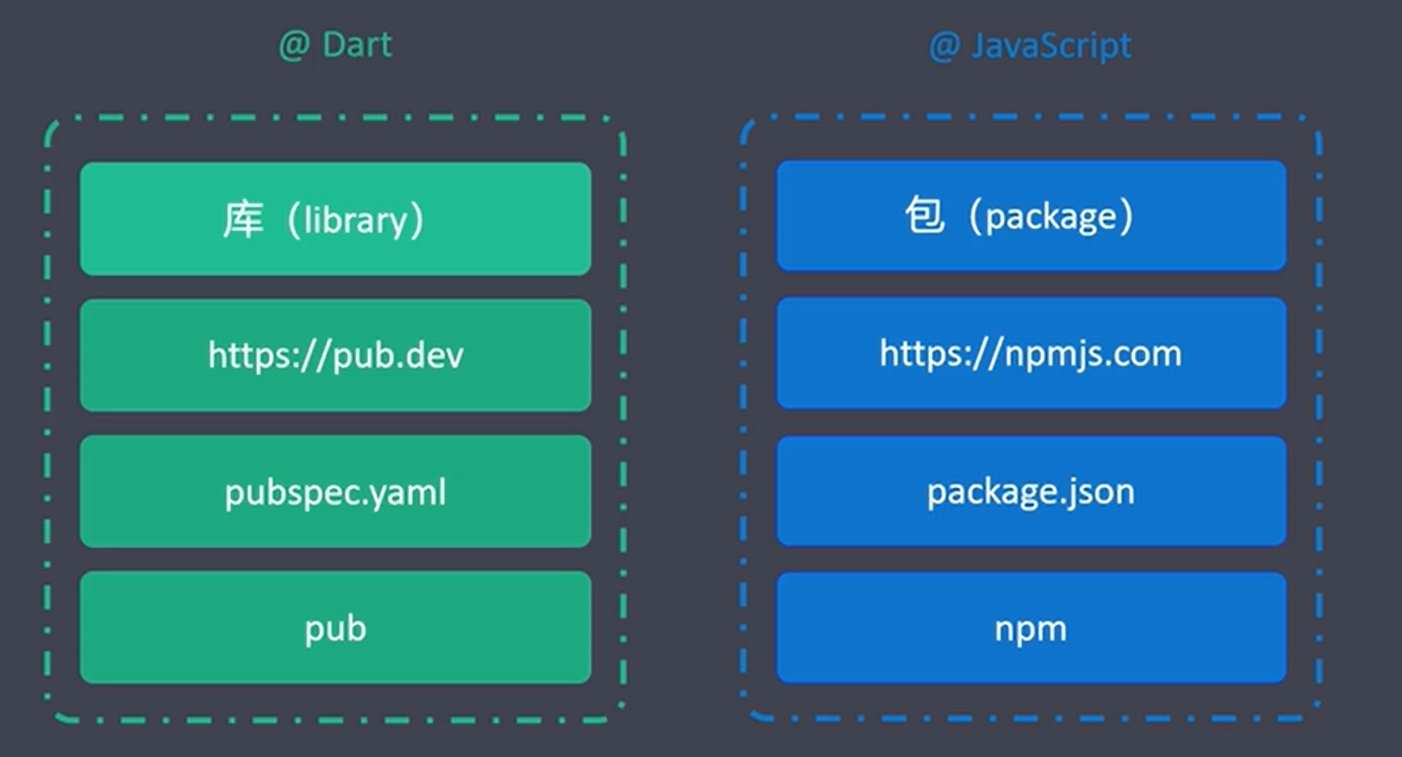
# 第三方库
来源(三个镜像):
使用:
- 在项目根目录下创建
pubspec.yaml文件 - 在
pubspec.yaml文件中声明依赖 - 执行
pub get下载依赖
包最后下载到 user/user_name/AppData/Local/Pub/Cache/hosed/...
- 使用
import 'package:xxx/xxx.dart'引入库
pubspec.yaml
name: my_app

description: A new Flutter project.

environment:
  sdk: ">=2.7.0 <3.0.0"

dependencies:
  http: ^0.12.2
# 引入部分库
仅引入需要的内容,既是按需加载
- 包含引入(show)
- 排除引入(hide)
lib/common.dart
void f1(){}
void f2(){}
void f3(){}
show.dart
import './lib/common.dart' show f1, f2;

void main(){
  f1();
  f2();
  f3(); // 报错,未暴露
}
hide.dart
import './lib/common.dart' hide f1, f2;

void main(){
  f1(); // 报错,已排除
  f2(); // 报错,已排除
  f3();
}
# 解决库冲突
- 库冲突,是不同库之间有同名属性或方法而产生的
- typescript 中使用命名空间来处理,dart 中使用
as关键字赋予库别名来处理
import 'dart:math' as math;
import 'lib/function.dart' as func;

void main(){
  print(math.max(1, 2)); // 2
  print(func.max(1, 2)); // 2
}
# 延迟加载
既是懒加载,通过 deferred as 标识需要延迟加载的库
import 'dart:math' deferred as math;

void main() async{
  await math.loadLibrary();
  print(math.max(1, 2)); // 2
}
# 组装库
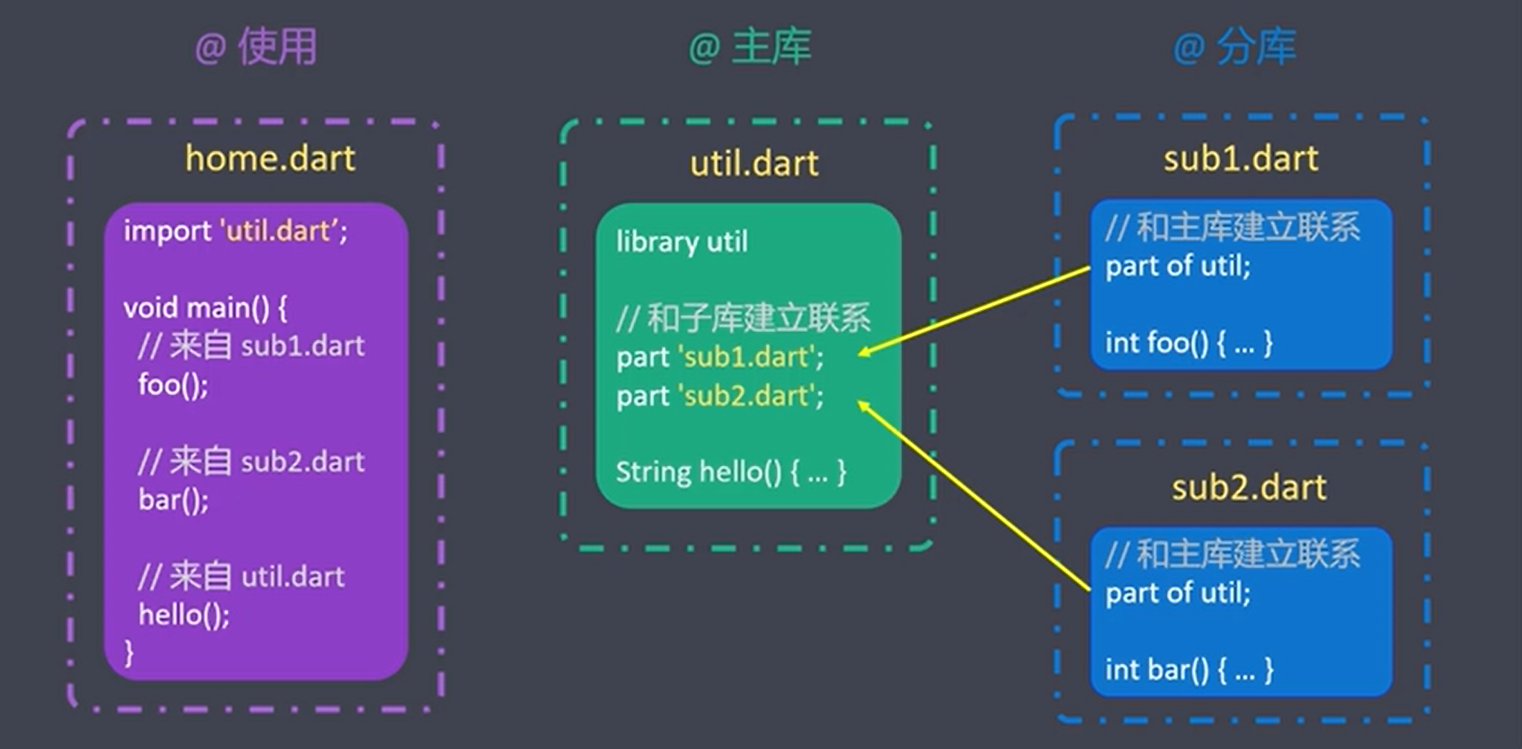
- 目的: 将多个库组装成一个库,方便引用
- 使用
part与part of建立库之间的关联
← Dart 摘要 浅析浏览器内核的运行 →