
# Electron
基于 Chromium 和 Node.js,使用 JavaScript、HTML 和 CSS 构建跨平台桌面应用程序的框架。
# hello world
mkdir hello-world
cd ./hello-world
npm init
npm install --save-dev electron
touch main.js
(将package.json 的入口文件改为main.js,添加start命令: electron .)

编写...完成后使用 Electron Forge 打包和分发
npm install --save-dev @electron-forge/cli
npx electron-forge import
npm run make

Electron-forge 会创建 out 文件夹,包括了可运行程序
# 使用 Electron fiddle
Electron fiddle 更像一个 code pan,不需要安装任何依赖,只关注编写几则代码就能运行起来,后面也可以 export 完整的程序代码 或 publish 一个 "fiddle" 到 github。
# 原理
# 技术架构
- Chromium
- NodeJS
- NativeAPI(MacOS、Win、Linux)
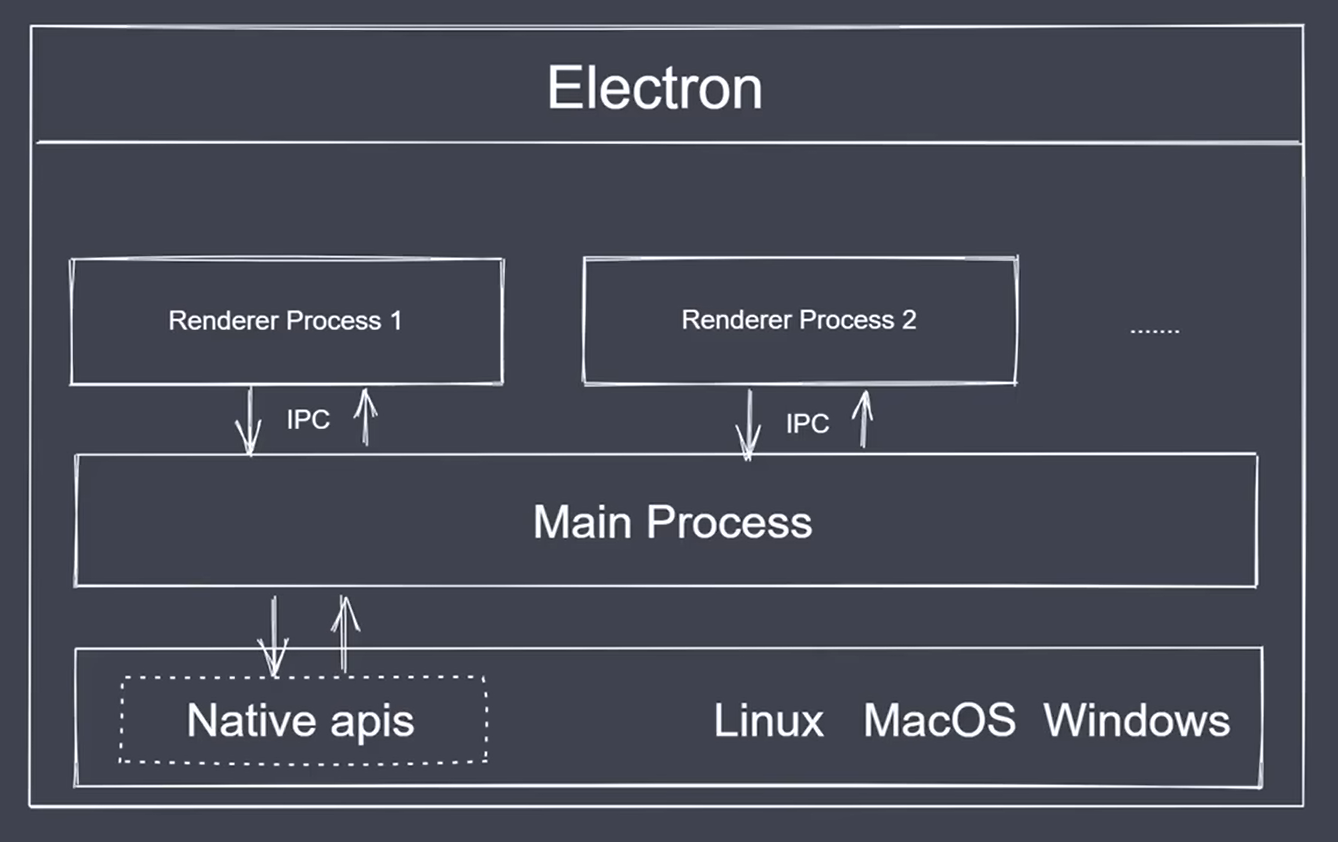
- 主进程(Main Process):泛指 main.js,一个应用仅有一个主进程,只有它可以调用 Native apis。
- 渲染进程(Renderer Process):一个应用可有多个渲染进程,它完成 windows 中界面的渲染。
- IPC:渲染进程与主进程间通信手段。
# LS 通信
# 生命周期
ready: app 初始化完成 - app - 1
dom-ready:一个窗口中的文本加载完成 - window.webContents - 2
did-finsh-load:导航完成时触发 - window.webContents - 3
window-all-closed: 所有窗口都被关闭时触发 - app - 4
before-quit: 在关闭窗口之前触发 - app - 5
will-quit:在窗口关闭并且应用退出时触发 - app - 6
quit: 当所有窗口被关闭时触发 - app - 7
closed: 当窗口关闭时触发,此时应删除窗口引用 - win - 8
注意:如果监听了 window-all-closed,需要主动调用 app.quit() 才会执行 quit 相关的事件。
# 流程模型
# API 摘要
- BrowserWindow 应用窗口
new BrowserWindow({
  x: 100,
  y: 100, //设置窗口显示的位置,相对于当前屏幕的左上角// 默认情况下创建一个窗口对象之后就会显示
  show: false, // 设置为false 就不会显示了,可以在 ready-to-show 事件调用 win.show()
  width: 800,
  height: 400,
  minHeight: 200,
  minWidth: 300, // 可以通过 min max 来设置当前应用窗口的最大和最小尺寸
  resizable: false, // 是否允许缩放应用的窗口大小
  icon: "",
  title: "",
  frame: false, // 取消显示选项卡菜单
  autoHideMenuBar: true, // frame 为 ture 时可用来隐藏菜单条
  webPreferences: {
    nodeIntegration: true, // 可以在渲染进程中使用 require()
    enableRemoteModule: true, // 可以在渲染进程中使用 remote 调用主进程API
  },
  parent: obj, // 指定父子窗口
  modal: true, // 子窗口是否为模态窗口
});
- electron.remote 在渲染进程中是无法调用某些主进程中的 API 的,如 BrowserWindow。 需要开启 webPreferences.remote,并这样调用:
new remote.BrowserWindow();
- Menu 自定义菜单栏
const menuTemp = [
  {
    label: "角色",
    submenu: [
      { label: "复制" role:'copy'},
      { label: "剪切" role:'cut'},
      { label: "粘贴" role:'paste'},
      { label: "最小化" role:'minimize'}
    ],
  },
  {
    label: '类型',
    submenu: [
      {label: '选项1', type: 'checkbox'},
      {type: 'separator'}
      {label: '选项2', type: 'radio'},
      {label: 'windows', type: 'submenu', role: 'windowMenu'}
    ]
  },
  {
    label: '其他',
    submenu: [
      {
        label: '打开',
        icon: './icon.png',
        accelerator: 'ctrl + o',
        click(){
          console.log('open');
        }
      }
    ]
  }
];

const menu = Menu.buildFromTemplate(menuTemp);
Menu.setApplicationMenu(menu);

// 动态创建菜单
const mi =  new MenuItem({label: '自定义', type: 'normal'});
const subMi = new MenuItem({label: '自定义', type: 'normal'});
mi.append(subMi);
menu.append(mi);
Menu.setApplicationMenu(menu);

// 右键菜单(在渲染进程中)
window.addEventListener('contextmenu',(ev)=>{
  ev.preventDefault();
  menu.popup({
    window: remote.getCurrentWindow()
  })
})
- ipcMain、ipcRenderer 异步通信
// 渲染进程中
ipcRenderer.send("msg1", "i am Renderer");
ipcRenderer.on("response1", (ev, data) => {
  console.log(data); // copy that
});

// 主进程中
ipcMain.on("msg1", (ev, data) => {
  console.log(data); // i am Renderer
  ev.sender.send("response1", "copy that.");
});
同步通信
// 渲染进程中
const val = ipcRenderer.sendSync("msg1", "i am Renderer");
console.log(val); // copy that

// 主进程中
ipcMain.on("msg1", (ev, data) => {
  console.log(data); // i am Renderer
  ev.returnValue = "copy that";
});
- Dialog
// 文件弹框
remote.dialog.showOpenDialog({
  defaultPath: __dirname,
  buttonLabel: "请选择",
  title: "xxx",
  properties: ["openFile", "multiSelections"],
  filters: [
    {
      name: "代码文件",
      extensions: ["js", "json", "html"],
    },
  ],
});

// 错误弹框
remote.dialog.showErrorBox("标题", "内容");
- shell、iframe
// 在浏览器中打开链接
shell.openExternal('https://www.baidu.com');

// 在应用中打开链接
<iframe>
- Notification
// 消息通知
window.Notification(title, option)
- globalShortcut
// 注册快捷键
globalShortcut.register('ctrl + q');
globalShortcut.isRegisted('ctrl + q');

// 注销快捷键
globalShortcut.unregister('ctrl + q');
globalShortcut.unregisterAll();
- clipboard
var cpd = null;
// 复制文本
cpd = clipboard.writeText(str);

// 黏贴文本
clipboard.readText(cpd);

// 复制图片
clipboard.writeImage(nativeImage.createFromPath('./temp.png'));

// 黏贴图片
clipboard.readImage()
# 开发
- 使用 nodemon 监听文件并自动执行。 package.json add
"scripts":{
 "start" :"nodemon --watch main.js --exec npm run build",
 "build":"electron"
}
使用 ctrl + R,来刷新界面
窗口中使用 ctrl + shift + i,打开调试面板
默认打开窗口的调试面板
mainWin.webContents.openDevTools()工具包
electron-is-dev:声明开发或生产环境变量
concurrently:连接多个命令,中间使用空格分隔,转义"
wait-on:等待某个结果执行之后再去执行后续的命令
cross-env:阻止调起浏览器,跨平台环境变量设置